
ダブルクリックで解凍
Double-click to extract
書庫をダブルクリックするだけで、同じ場所に解凍します。フォルダは必要なときだけ自動で作ります。
Double-click an archive and it is extracted next to it. A folder is created only when one is needed.

Lhaplus の使い心地のまま、今の書庫に対応した圧縮・解凍ソフト。
A simple archiver in the spirit of Lhaplus, ready for today's archives.
約 54 MB ・ 管理者権限は要りません ・ ふつうはこちら
About 54 MB · no administrator rights needed · the one most people want
「Windows によって PC が保護されました」と表示されたら
まだコード署名をしていないため、Windows の SmartScreen が警告を出します。「詳細情報」を押してから「実行」で進めます。心配な場合は、ダウンロードしたファイルのハッシュが上のチェックサムと一致するか確かめてください。
If you see "Windows protected your PC"
The installer is not code-signed yet, so Windows SmartScreen warns about it. Choose "More info" and then "Run anyway". If in doubt, check that the file's hash matches the checksums above.
概要
Overview
Lhaplus は「余計なことをしない」という一点で今も使われ続けている圧縮・解凍ソフトですが、最後の更新は 2015 年です。smarcivaZIP はその手軽さはそのままに、RAR5 や Zstandard、海外製 ZIP の文字化け、macOS で作られた書庫といった、今の書庫で困る場面に対応しました。
Lhaplus is still loved for doing nothing more than it should, but it has not been updated since 2015. smarcivaZIP keeps that simplicity and handles what trips people up today: RAR5 and Zstandard, garbled file names in ZIP files made abroad, and archives created on macOS.
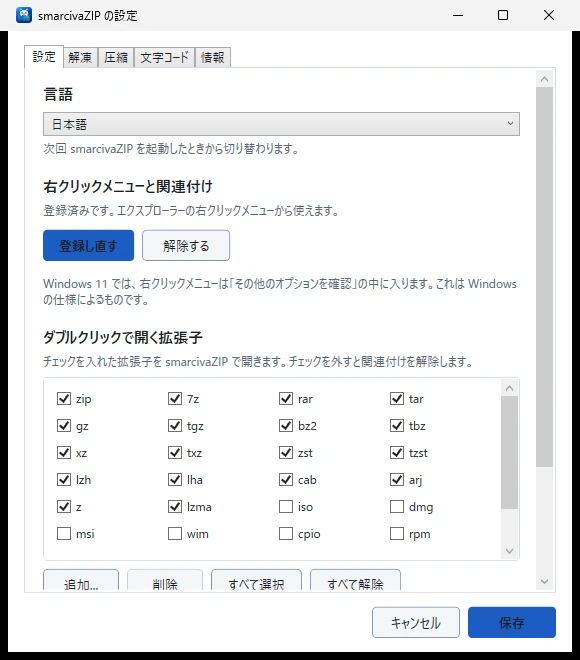
設定画面はありますが、開かなくても困らないようにしてあります。
There is a settings window, but you should never need to open it.
特長
Features
書庫をダブルクリックするだけで、同じ場所に解凍します。フォルダは必要なときだけ自動で作ります。
Double-click an archive and it is extracted next to it. A folder is created only when one is needed.
ZIP・7z・tar.gz などを選んで圧縮。複数のファイルを選んでも、ひとつの書庫にまとまります。
Pick ZIP, 7z, tar.gz and more. Select several files and they end up in a single archive.
RAR5・Zstandard・XZ・LZH などを解凍。ZIP は AES-256 のパスワード付きでも作れます。
Extracts RAR5, Zstandard, XZ, LZH and more. Creates ZIP files protected with AES-256 passwords.
ZIP のファイル名の文字コードを自動で判定します。判定に迷ったときだけ、一覧を見て選べます。
Detects which encoding a ZIP file's names use. Only when unsure does it show you a list to choose from.
濁点が分かれてしまった名前を直し、__MACOSX や .DS_Store を取り除きます。
Repairs names whose accents were split apart, and removes __MACOSX and .DS_Store.
Zip Slip や Zip Bomb を検出して止めます。インターネットとは一切通信しません。
Stops Zip Slip and Zip Bomb archives. It never connects to the internet.
使い方
How to use
| 操作 | 動作 |
|---|---|
| 書庫をダブルクリック | 同じ場所に解凍 |
| 右クリック → smarcivaZIP → ○○ に圧縮 | その形式で圧縮 |
| 右クリック → smarcivaZIP → ○○ に圧縮(パスワード) | パスワードを聞いてから圧縮 |
| 右クリック → smarcivaZIP → ここに解凍 | フォルダを作らず解凍 |
| 右クリック → smarcivaZIP → フォルダを作って解凍 | 必ずフォルダを作って解凍 |
| 右クリック → smarcivaZIP → 文字コードを選んで解凍 | ファイル名を確かめてから解凍 |
| Action | Result |
|---|---|
| Double-click an archive | Extracts it in the same place |
| Right-click → smarcivaZIP → Compress to … | Compresses in that format |
| Right-click → smarcivaZIP → Compress to … (password) | Asks for a password, then compresses |
| Right-click → smarcivaZIP → Extract here | Extracts without creating a folder |
| Right-click → smarcivaZIP → Extract to a new folder | Always extracts into a new folder |
| Right-click → smarcivaZIP → Extract, choosing the encoding… | Lets you check the file names first |
smarcivaZIP は MIT License のオープンソースで、無保証で提供されます。圧縮・解凍には 7-Zip の 7z.dll(LGPL)を使っています。通信は一切行わず、個人情報も集めません。
smarcivaZIP is open source under the MIT License and is provided without warranty. It uses 7z.dll from 7-Zip (LGPL). It never connects to the internet and collects no personal information.